sexta-feira, 10 de maio de 2019

9 Best Android Gaming Tablets with Powerful Graphics and Processors

Even Nintendo, a company known for their refusal to bring their games to mobile devices, had to admit that customers love playing games on the go. That's, of course, no news to Android fans who have been enjoying addictive mobile games for years. But it's one thing to play a game such as Candy Crush Saga, and it's something completely different to immerse yourself in the complex gameplay of Hearthstone, a deceptively simple and insanely fun fast-paced strategy card game from Blizzard Entertainment, the creators of Warcraft, Diablo, and StarCraft series.

* Links in this table contain affiliate links, which means at no additional cost to you, we will earn a commission if you click through the link and make a purchase. Thank you for your support. For more details, please visit our Privacy policy page.

While simple, casual games run on just about any budget or mid-range Android device, triple-A titles, including The Room, Asphalt 8, Dead Trigger 2, Real Racing 3, Grand Theft Auto: San Andreas, Minecraft, or UNKILLED, require beefy hardware specifications to achieve smooth frame rates. The good news is that you can choose from many Android gaming tablets with powerful graphics and processors. Let's have a look at some of the more popular gaming tablets available today.

Samsung's Galaxy Tab S4 is one of the best tablets in the business today. It's also the perfect choice for gaming. It has a large 10.5-inch display, which not only gives you plenty of real estate for watching movies and TV shows, but also for playing games. Equipped with some high end screen resolution, you'll get really great clarity and detail in anything you do as well.

Additionally, apps and games work really well on this tablet, all thanks to its fast processor and plenty of RAM. This also allows for unparalleled productivity. Of course, we won't forget to mention that this one comes with an S-Pen, as well as a big battery for days of gaming on end.

Buy it now: Amazon

The Google Nexus 9 might be a couple of years old now, but it's still an excellent choice for those looking to get some decent gaming done on mobile. As implied by the name, the screen size sits at around 9-inches in size, but comes with some excellent screen clarity for watching movies, TV shows, or YouTube. Games like Auralux, San Andreas, and plenty of other titles look excellent on the screen, too. It's substantially different than other tablets, featuring the clean and vanilla Android experience. There is no bloated interface here.

Overall, it's slim, it's fast, and has great battery life.

Buy it now: Amazon

Pixel Slate

The Pixel Slate is another excellent choice, though admittedly not one that everyone can afford. The Pixel Slate is the latest laptop from Google intended to be your go-to laptop replacement. That said, it really is an excellent cross between a tablet and a laptop. The Pixel Slate has a big display, giving you plenty of room for watching full-screen content, as well as playing all of your favorite games. And with a competitive resolution, the Pixel Slate keeps things ultra sharp. Want to use it as a laptop? Grab a type cover keyboard and replace your laptop with it. It has mouse functionality as well.

There are some nice hardware options here, allowing you to choose what's best for your productivity needs — you can choose a Core M3, Core i5, or Core i7 processor. Suffice to say, this one will be able to handle anything you throw at it.

Buy it now: Amazon

Sure, this one might not be an Android tablet, but Microsoft's Surface Pro is one of the best devices that you can buy today for easy gaming on the go. It's essentially a large tablet that boasts the performance of a standard PC or laptop. Compared to standard Android tablets today, it runs circles around them, even in viewing media! If you wanted, you could easily play StarCraft or World of Warcraft on this bad boy, so long as you have a mouse and keyboard attachment to go with it.

The Surface Pro is all about versatility, too. You can outfit this one with a type cover, and use it as a laptop. It already comes with its own kickstand, giving you better viewing angles when watching movies and TV shows. It's also affordable, especially when considering the performance here.

Nvidia Shield K1

When Nvidia first announced their Android gaming tablet, not everyone was convinced they can pull it off. After all, it's one thing to develop and manufacturer dedicated graphics cards, and it's something else to create an entire handheld device from scratch. Fortunately for all gamers, they've succeeded and created what might well be the best mid-range Android tablet on the market—gaming or not.

The Nvidia Shield K1 tablet has a plain, understated design that smartly ditches the typical showy gaming aesthetics in favor of a more mature design, one that you actually wouldn't be ashamed to display in public. The top and bottom edges of the tablet house speaker grids which are coated with rubber grips for more secure gaming. The back has a matte black finish interrupted only with a silver Shield logo right in the middle.

All control buttons, slots, and ports are located around the edges, and the only two other things on the front and back of the tablet are Shield's 5 MP cameras. Both cameras are virtually identical in terms of their image quality and low-light performance, but the rear-facing camera can shoot full HD video at 30 frames per second.

Moving inside, the K1 is powered by the Nvidia Tegra K1 chipset which has four 2.2 GHz Cortex-A15 cores and Nvidia's own GeForce Kepler GPU with 192 processing cores. This translates to an impressive score of around 73,000 in AnTuTu, placing the tablet near the top. Given how large modern Android games can be, it's a shame that Nvidia included only 16 GB of internal storage with just 11.24 GB available out of the box. At least, you can extend the storage space with a microSD card.

The one thing that makes the Nvidia K1 so different from other Android tablets is its support for the GeForce NOW game-streaming service. Using NOW, gamers can play PC titles, such as Mad Max, and The Witcher 3, on the tablet. The NOW app streams games at 1080p at up to 60 frames per second over Wi-Fi, allowing you to control them with the optional Shield Controller. You can also do things the other way around and stream mobile games to your TV.

While we had a blast playing games on the K1, it were the tablet's speakers that blew us away. Believe it or not, they sound almost as good as the JBL Charge 2 or UE Boom 2. And unlike with the latest iPhone, you have a 3.5mm headphone jack to plug in your favorite headphones or dedicated speakers, if you so desire. Shield's 5,200mAh battery lasts around 5 hours, which is a respectable value for a relatively compact 8.0" tablet with a resolution of 1920 x 1200 pixels.

As it is, the Nvidia Shield K1 is a fantastic mid-range Android tablet for anyone, not just gamers. It offers an excellent value, near-stock Android 6.0 experience, and plenty of extra features that guarantee you'll always have something to do.

What Users Like
  • Affordable
  • Great gaming and multimedia performance
  • You can play PC games on the tablet
  • Long battery life
  • Sharp cameras
  • Android 6.0 Marshmallow
  • Samsung Galaxy Tab S

    There's no doubt that Samsung knows how to make beautiful Android devices. At 0.65 pounds 0.26-inch, the Samsung Galaxy Tab S is one of the lightest and thinnest tablets on the market. Its light weight makes it easy to hold, preventing fatigue after long use. Samsung's signature oval home button is located on the bottom bezel, and so is a pair of capacitive buttons for going back and switching between apps. The location of the buttons together with the small size of the bezels doesn't provide nearly as much thumb space as we would like to have, but Samsung sells handy cases, which elegantly solve the problem.

    The main selling point of the Samsung Galaxy Tab S is the gorgeous, colorful Super AMOLED capacitive touchscreen with a resolution of 2560 x 1600 pixels, amazing 100000:1 contrast ratio, and support for 94% of Adobe RGB color gamut. It's likely the best tablet screen currently available for mixed multimedia consumption, including pictures, movies, and, above all, games. The included movie app can automatically adjust the color gamut, sharpness, and contrast of the screen to enhance your viewing experience.

    To make those 4,096,000 pixels move without any frame rate drops, Samsung went with the Qualcomm Snapdragon 800 chipset, Adreno 330 GPU, and 3 GB of memory. By today's standards, those are not the best components we see in use, but they still hold up to this day. It's possible to push the tablet beyond its limits by running multiple demanding apps at the same time, but you really have to try hard to do that. Another handy way how you can take advantage of the available processing power is Samsung's multi-window function. Using this feature, you can, for example, have watch videos and check your email simultaneously, although the selection of supported apps is somewhat limited.

    Other notable features include a fingerprint scanner and an IR blaster on the top edge. The tablet runs on Android 4.4 with TouchWiz UI slapped on top of it. This iteration of TouchWiz is a far cry from the stock Android experience, but some of its features are easy to get used, even if they can be quite resource-hungry.

    Even with the 7,900mAh battery, you can't expect the tablet to last a whole day of heavy use. The high-definition screen eats up electricity like thousand hungry piranhas. One way how you can overcome this problem is to purchase a power bank, or you can just stay in a close proximity to a charger.

    For its high-end price of around $500, the Samsung Galaxy Tab S isn't the most affordable tablet you can buy. But it has a stunning screen, ample processing power, and beautiful design. Let your own budget decide whether the tablet is worth the price.

    What Users Like
  • Vivid, sharp screen
  • Elegant, lightweight design
  • Great performance
  • Above-average battery life
  • ASUS ZenPad S 8

    ASUS has achieved something remarkable with the ZenPad S 8: The company has created a stunning fashion-oriented tablet for a fraction of the cost of the small iPad. ZenPad's textured back cover combined with small bezels and compact size give it a universal appeal and timeless elegance. Mind you, those are some strong words for a tablet that retails for around $150 on Amazon.

    The crown jewel of the ZenPad S 8 is its 8" IPS LCD capacitive touchscreen with a resolution of 1536 x 2048 pixels and a 74% screen-to-body ratio. Even though the screen takes most of the real-estate on the front side of the tablet, both the top and the bottom bezels are large enough to give your thumbs something to hold onto while you play an Android game or watch a movie. The display also supports the ASUS VisualMaster technology for exclusive visual enhancements that combine hardware and software to deliver an incredibly realistic visual experience. It includes latest image processing technology found on high-end TVs, intelligent contrast enhancement, sharpness optimization, and an ambient sensor for a vivid outdoor viewing experience, among other things.

    ASUS went with an Atom chipset, instead of MediaTek or Snapdragon. More specifically, the ZenPad S 8 has an Intel Atom Z3580 inside, alongside a PowerVR G6430 GPU and 4 GB of memory. There's also a cheaper version with just 2 GB of memory and Atom Z3560 available, but we highly advise you to avoid it. 2 GB RAM is simply not enough these days for serious multitasking. That being said, the performance of the beefier version of the tablet runs smoothly and handles all modern Android games with ease.

    The only thing we didn't like about the tablet is the rear-facing 8 MP PixelMaster camera. Despite being fast and responsive, even pictures taken under direct sunlight turned out to be slightly blurry and washed out. The front-facing 5 MP selfie camera is much better, being on par with all tablets in the sub-$200 price range.

    ASUS sells a nifty stylus, Z Stylus, to provide a natural writing and drawing experience. The stylus has 1024 levels of pressure, 150 hours battery life, and its writing tip is just 1.2mm thick, allowing you to quickly jot down notes or doodle silly pictures. The functionality of the Z Stylus is tied into the innovated ZenUI, which has more than 1,000 features, most of which are surprisingly useful and unobtrusive.

    What Users Like
  • Affordable
  • Lightweight and sleek
  • Razor-sharp screen
  • microSD card slot
  • Solid performance
  • Sony Xperia Z4

    Not to be confused with the Xperia Z4 smartphone, the Sony Xperia Z4 is a 10.1" tablet with a brilliant 2K display and specifications that make many of its rivals pale in comparison. From the first moment you get your hands on the tablet, you know that it means a serious business. Despite being a large 10-incher, the Z4 is just 6.1mm thick and weighs only 389g. Its rounded edges and curved corners make it comfortably fit in your hands, and the textured back cover gives you something to hold onto why you carry the tablet around.

    These days, waterproof smartphones are becoming increasingly commonplace, but waterproof tablets are still a dime a dozen. That's why we were happy to find out that we can take the Xperia Z4 with us to a bathtub without clenching it like a lifeline. Its IP68 certification ensures that even if you manage to drop it into water, the tablet will survive just fine, thanks to its waterproof construction up to 1.5 meter and 30 minutes.

    If the ASUS ZenPad S 8 gave the iPad mini a run for its money, the Sony Xperia Z4 does the same with mini's large brother. Put the two tablets side by side, and you immediately notice how much better the display is on the Z4. With its resolution of 2560 x 1600 pixels and X-Reality Engine, Sony has created what might as well be the brightest screen and the most vivid IPS LCD capacitive touchscreen on the market. Compared to its predecessor, the Xperia Z2, the new display is 40% brighter

    Ticking below the display is a Qualcomm MSM8994 Snapdragon 810 chipset with Adreno 430 and 3 GB of memory. The tablet delivers a buttery smooth performance with no frame rate drops even when playing demanding games, such as Hearthstone. Unfortunately, Sony doesn't let you take full advantage of Z4's power by implementing side-by-side multitasking.

    Sony clearly saved some cash on the rear-facing camera, as it produces somewhat underwhelming pictures, which, while serviceable, are leaps and bounds away from what you might be used to from Sony's smartphones. The sharp front-facing camera saves the day with its above-average sharpness and low-light performance.

    Overall, the Sony Xperia Z4 is a deal you shouldn't miss. Because of its age, you have a good chance of finding a good second-hand model or stumbling upon a great discount on Amazon.

    What Users Like
  • Fantastic display
  • Great battery life
  • Waterproof
  • User-friendly overlay
  • Smooth performance
  • Lenovo TAB 2 A10

    In the world of extravagant high-end smartphones and tablets, the Lenovo TAB 2 A10 doesn't initially seem all that remarkable. That is until you discover that it costs just $149, has a full HD screen with vivid colors and excellent viewing angles, and plays all the latest Android games with ample processing power to spare.

    The 10.1" IPS LCD capacitive touchscreen with 1200 x 1920 pixels is really the main highlight of this tablet. For an entry level price, you can have a premium multimedia experience for hours on end. That's because the 7000 mAh non-removable Li-Ion battery comfortably lasts a full day of moderate usage.

    The Lenovo TAB 2 A10 is powered by a MediaTek MT8732 chipset and 2 GB of memory. The MediaTek chipset isn't the fastest chipset in the world, but it holds up nicely and we never found ourselves longing for something better, especially not for the amazing price. Unsurprisingly, neither the 8 MP rear-facing camera nor the 5 MP front-facing camera are nothing to write home about. They take usable pictures, but don't expect them to replace your high-end smartphone or a point-and-shoot camera anytime soon.

    What was surprising about the tablet was its sound quality. The TAB 2 features a multi-speaker sound bar located on the back, near the top edge of the tablet. The speaker is enhanced with Dolby Atmos Cinematic Moving Audio, to deliver gorgeous sound that flows in all directions. Combined with the sharp display, the Lenovo TAB 2 A10 is an amazing multimedia and gaming machine.

    What Users Like
  • Full HD display
  • Great audio quality
  • Long battery life
  • Strong performance
  • * Links in this table contain affiliate links, which means at no additional cost to you, we will earn a commission if you click through the link and make a purchase. Thank you for your support. For more details, please visit our Privacy policy page.

    Verdict

    As you can see, there are a ton of great tablets available out there today. While many of them aren't designed with Android gaming exclusively in mind, most of these have top tier hardware that will handle any game on Android, too. The Samsung Galaxy Tab S4 is an excellent example of that.

    Most of these come with great battery life as well, allowing you to game for hours on end. What's your favorite Android tablet for the purposes of gaming? Let us know in the comments section below.


    44 best Skyrim mods you should download on Xbox One, PS4 and PC

    It's been around for the best part of a decade, so to inject some life into Bethesda's fantasy epic, you need to download some of the best Skyrim mods. The Elder Scrolls Skyrim hasn't aged particularly well, but you can transform it into a stellar RPG with these best Skyrim mods, from graphic enhancements and quality of life improvements to huge new quest lines and even brand new companions. In our list of the best Skyrim mods below, we've listed what platform each mod is available on, along with a respective link to either the NexusMods page for PC or the Bethesda mod site for console.

    Quests

    best Skyrim mods quests

    Read more

    Elder Scrolls 6: release date, trailer, news, and everything else we know

    FalskaarAvailable on:  Xbox One, PC

    Those of you who have finished Skyrim should head immediately to Falskaar. Considering it's the size of a DLC and that it landed its creator a job at Bungie, the fact that it's on this list shouldn't be that surprising. As the harbinger of an ancient prophecy (minus any special powers), you have to bring peace back to Falskaar - but nothing is ever as simple as it seems...

    Forgotten CityAvailable on:  Xbox One, PC

    This is the best story mod out there, in my honest opinion. Stuck in an underground town overseen by old automated Dwemer moral police system, you just have to find a way out. Sounds simple, doesn't it? Oh, just you wait...

    ClockworkAvailable on: Xbox One, PC

    The Dwemer don't really get enough time dedicated to them in Skyrim, despite being the most enigmatic race to ever grace Nirn. Yet this strange mansion you stumble upon is run by two of their contraptions...and their master is missing. Guess you'd better find out what's gone on!

    Moonpath to Elsweyr

    Available on: Xbox One, PC

    Moonpath to Elsweyr connects Skyrim to the vast deserts of the feline Khajiit. Here, you can bask under azure skies and hunt ferocious raptors in wild tangles of bush and jungle. This was actually one of the first quest mods ever made for Skyrim, but has recently started receiving regular updates again, making it one of the best mods around at the moment.

    Beyond Bruma Available on: Xbox One, PC

    Do you remember the days you spent wandering around Bruma back when Mehrunes Dagon threatened to destroy Tamriel in Oblivion? Well, now you can go back to Bruma from Skyrim. With over 70 residents, Bruma looks better and feels more alive than ever before.

    Markers: No more wandering aimlessly 

    best Skyrim mods markers

    Stones of Barenziah markersAvailable on: PS4, Xbox One, PC

    The bloody Stones of Barenziah. This quest sat in my tray for the time it took me to complete all the major quests and a chunk of the sidequests, and I had only found about six. This mod is essential if you want to get all of the stones and find out what mysterious item they make in the end. 

    Impatience of a Saint markersAvailable on: PS4,  Xbox One, PC(Not on Nexus, so it's on Bethesda's mod website)

    I was running around the hellish Soul Cairn in circles for a good hour trying to find all of the pages to Jiub's opus, and this mod cut that time down to about ten minutes. Completely worth it. 

    Travelling around Skyrim

    best Skyrim mods travel

    A Quality world map and Solstheim mapAvailable on: Xbox One,  PC

    My god, I cannot emphasise enough how much better this mod made Skyrim. If you're like me and you don't like to fast-travel the vanilla map, whilst pretty, is almost useless when you're trying to find a road which will take you from Riften to Solitude. This mod overhauls the map so it's easy to find routes between cities and picks out most of the paths you could easily miss otherwise.

    Diverse dragons collectionAvailable on: Xbox One, PC, and try Splendor: Dragon Variants on PS4

    As soon as you unlock your dragonborn blood, appearances of these winged reptiles will start becoming as regular as rain. So why not spice up the sight of them appearing on the horizon with this mod, which introduces 28 news dragons, each with a different model and texture. As well as the typical frost and fire breath, some even have a drain vitality attack, and thanks to their unmistakable appearances you'll be able to tell which one is swooping towards you on the horizon. Gnarly. 

    Rain and Snow FXAvailable on: PS4, Xbox One, PC

    A small addition but one that makes a bucketload of difference: makes you look wet in rain, and frost tints you body when you're walking through a blizzard.Note: The PC link leads to the 'Wet and Cold' mod, which has a very similar effect. 

    Better horsesAvailable on: PS4, Xbox One, PC

    Among other things, this equine mod has a new horse AI so your mount will flee combat, more stamina (so more galloping), invulnerability (especially useful for me as I tend to Leeroy Jenkins in every fight), plus they're faster.Note: The PC link leads to the Bethesda.net website, as the NexusMods file is no longer supported.

    Open Cities SkyrimAvailable on: Xbox One, PC

    This means that you don't have to endure loading screens when you enter cities, which makes for a beautifully seamless transition between shooting deer in the wilds and selling your haul from raiding dungeons to merchants. 

    Castle Volkihar reduxAvailable on: PS4, Xbox One, PC

    For those bloodsuckers amongst you this mod is sure to be a favourite, as it turns Castle Volkihar into a small town, finally making it feel like you're really part of the night-walking, bat-loving elite.Note: The PC link leads to the Bethesda.net website.

    Really useful dragons Available on: PC

    Have you ever gotten bored of dragons? Although the diverse dragons mod makes the colossal beasts far more interesting, they're still the same serpentine monsters you've been slaying since 2011. Cue really useful dragons, which changes all the dragons in Skyrim into Thomas the Tank Engine trains. You're welcome.

    Improving gameplay

    best Skyrim mods gameplay

    Skyrim Special Edition Unofficial PatchAvailable on: Xbox One, PS4, PC

    I'll keep this brief: download it. It fixes a ton of bugs and is compatible with the vast majority of mods. Win-win.

    The Choice is YoursAvailable on: Xbox One, PC

    Have you ever been seriously annoyed about the fact that unfinished quests just sit in your journal forever? Well, thanks to The Choice is Yours, you can just straight up reject quests. Sorry, I'm the Dragonborn. I haven't got time to fetch you a mammoth's tusk. 

    Static Mesh ImprovementAvailable on: Xbox One, PC

    This mod adds vast, very visible improvements to the 3D models for most objects in Skyrim. It replaces the low-polygon meshes for most banal objects in the game, and trust me - you'll notice the difference. If you're still unconvinced, head over to their page on Bethesda or Nexus and see the screenshots for yourself.

    Skyrim graphic overhaulAvailable on: Xbox One, PC

    It's simple: this mod makes Skyrim look a ton better. It adds textures to objects in-game such as more plants and grasses, fur looks like fur and not sheets of grey, as well as smoke. Expect in-game immersion to shoot up after installing this mod.Note: The PC link leads to Osmodius' SSE Texture pack, which livens up the textures to the same degree as the mod on Bethesda's site.  

    Alternate start - live another lifeAvailable on: Xbox One, PC

    Fed up with being the Dragonborn? I don't blame you, and this mod lets you start as almost anything from a necromancer's assistant to a shipwrecked sailor. For those of you who love to replay Skyrim, it lets you roleplay to your heart's content.

    Become a BardAvailable on: Xbox One, PC

    As if the title wasn't self-explanatory enough, I'll spell it out for you: this mod lets you become a proper bard, not just a travelling Dragonborn who occasionally helps out the Bard College in Solitude. You can pick your preferred instrument, decide which songbooks you want to specialise in, choose bard followers, and play songs anywhere including in taverns where you'll earn tips for your musical endeavours. Become a Bard gives the Bard's College a purpose, letting it stand tall alongside the Thieves' Guild, the Companions and the College of Winterhold.

    Dragon souls to perksAvailable on: Xbox One, PC

    By the time you've sunken about 50 hours into Skyrim, you've probably got a heap of dragon souls sitting beside your Thu'ums, useless. If you don't use shouts particularly often, this mod makes sure the souls don't go to waste. They let you 'buy' perks, with the ones higher up the skill trees costing more souls to purchase. Get out there and slay some dragons!

    Ordinator - Perks Of SkyrimAvailable on: Xbox One, PC

    An almighty overhaul of Skyrim's perk tree, this adds 400 new perks, bulking out each basic skill to give a ton more options to spend your precious perk points on. From 'Fog of War' in the stealth tree to 'Flee Fool' in the two-handed tree, there's plenty of new abilities to master!

    Left hand ringsAvailable on: Xbox One, PC

    Pretty simple, but somehow overlooked by Bethesda - after all, rings aren't restricted to your right hand in real life, so why should they be in Skyrim?

    Sounds of Skyrim: Civilisation; Dungeons; The WildsAvailable on: PC

    The immersion will jump once you install this mod, as it means that dungeons, towns, and the countryside will sound different each time you venture out. That means no more hearing the same birdsong no matter where you are, no more repetitive dripping from Ancient Norse obelisks, or certainly a rediction in that dratted clanging sound of the blacksmith's hammer in every city you go to.  

    Unread books glowAvailable on: Xbox One, PC

    The completionist in me loves this mod. Make sure to make this one of the first mods you download though, as if you download it mid-game all the books you've read to that point will be marked as unread. The feeling of reading the last glowing book before you add it to your collection is so satisfying.

    Newmiller's spell books retextures 2 Available on: PC

    To build on that last mod, you can actually download a texture pack that turns Skyrim's ordinary spell books into leather-bound tomes that look as if they'd smell musty. These are arcane texts, after all — they've probably been around for hundreds of years!

    Useful Alteration Available on: Xbox One, PC

    This mod will change your life. Although Alteration is often seen as the ugly duckling of the arcane arts, installing Useful Alteration will provide the College of Winterhold's Tolfdir with a whole new range of Alteration tomes. Described by the modder as "annoyance removal" spells, these are generally used to make playing Skyrim less mundane. "Solve" solves a nearby pillar puzzle immediately, while "Unlock" automatically unlocks a locked chest or door. Who knew that Alteration was the best magic school? 

    Fixing NPCs

    best Skyrim mods npcs

    Realistic conversation overhaulAvailable on: PS4, Xbox One, PC

    Ever been walking through one of Skyrim's cities when five citizens are suddenly simultaneously clamouring for your attention? Of course you have. The people roaming through Windhelm, Riften, and Falkreath just love to chat and this mod lets them do it to their heart's content. Just, to other NPCs - not you. This means strolling through a village is suddenly much more immersive with its inhabitants having a chat outside the Inn or as a break from harvesting wheat. Small change, but a big difference.

    Immersive citizens AI overhaulAvailable on: PS4, Xbox One, PC

    NPCs in Skyrim are interesting beings to say the least, as they'll try to pick a fight with any dragons swooping around their village. This mod means that they won't try to fight you (or any other overpowered creature) if you're a higher level than them; instead they'll run and hide in a hideout, which will be assigned randomly and could be a home, temple, Jarl's stronghold, or anything similar.

    Immersive PatrolsAvailable on: PS4, Xbox One, PC

    If the sight of golden skin of the Thalmor looming over the horizon, or the sound of the self-righteous Stormcloaks as they tramp by deafens you, this mod is what you're looking for. No longer do just the two civil war factions patrol round Skyrim: Immersive Patrols adds scheduled Dawnguard, caravan, and guard patrols to Skyrim and Reaver, Skaal, Redoran, and Riekling patrols to Solstheim, as well as making existing patrols regular. It also adds moderately-sized civil war fort battles so you can sink your axe, arrow, or destruction magic of choice into even more heads. 

    Run for your livesAvailable on: PC

    NPCs in Skyrim are surprisingly ballsy. They'll take on bandits and even dragons. That's fun to watch, but it will sometimes result in quest-givers getting roasted a bit too badly, and expiring before your very eyes. This mod changes that, and makes NPCs run for cover when enemies approach, which saves you the trouble of running around trying to save the brave, valiant idiots.

    Relationship dialogue overhaulAvailable on: PC

    No more hearing about arrows in knees. NPCs get more dialogue options with this mod, and they even address you with over 50 different voice times. There's nothing like the thousandth hearing of not-Schwarzenegger's 'Let me guess. Somebody stole your sweetroll?' for breaking immersion. 

    The Paarthurnax dilemmaAvailable on: Xbox One, PC

    I got quite irritated at the quest Delphine gives you to kill Paarthurnax, as there's no option to quite simply say no. If you decline, the quest has to litter your journal for eternity. That's all changed in this mod, so you can spare your scaly friend and let him fly free. 

    Combat: make things more deader

    best Skyrim mods combat

    Phenderix: magic evolvedAvailable on: PS4, Xbox One, PC

    For those who love the sight of lightning crackling from their fingertips, you're spoilt for choice with this mod as it adds over 370 new spells. There are new spell archetypes, including bombs, growth, and plus you can summon any creature in Skyrim! 

    Better combat AIAvailable on: PS4, Xbox One, PC

    With this mod NPCs fighting styles drastically change. Now they'll try to block, bash, and stagger, as well as disengage from melee combat when they get too far away from ranged characters. Genius!Note: the PC link leads to 'Combat Evolved' mod, which does a very similar thing. 

    Enhanced blood texturesAvailable on: Xbox One, PC, and try Increase Blood Amount on PS4It's simple and the title says it all. Gore never looked better. 

    VioLens: A Killmove modAvailable on: PS4, Xbox One, PC

    I love seeing my character execute a badass kill-move to take down enemies, and this mod makes fighting a joy. Flourishes when you're about to kill somewhen while dual-wielding, brutal finishers, executions for dragons - it really has it all.

    Wounds Available on: PC

    So you've been absolutely wrecked by a Draugr Deathlord, barely escaping with your life. However, all you have to do is down a health potion or two before you're back to normal. With Wounds, you can actually pick up debilitating injuries that take days, weeks, or even months to heal properly. Smashed femur? That's going to be an issue for two whole months.

    Voice of Madness: A Wabbajack ShoutAvailable on: PS4

    Unfortunately, this mod is only on PS4 at the moment. However, if you're lucky enough to own a copy of Skyrim on PS4, and unlucky enough to have yet to experience the wonder of this mod, you should download it immediately. Everybody knows Sheogorath is the Daedric Prince of Madness, but what happens when you harness his chaotic energy and channel it into your Thu'um? Prepare to Wabbajack enemies into Oblivion and rain explosive cheese from darkened skies!

    Cross and JabAvailable on: PC

    In some games, hand-to-hand combat is a joy. Just think of all the Fists of Fury quests in The Witcher 3! However, it's pretty mundane in Skyrim. Cross and Jab changes that by adding in faster, more diverse punching animations, to the extent that you'll likely start taking on dungeons as a bare-knuckle boxer just because of how satisfying it feels. It's time to become Skyrim's world heavyweight champion.

    Bonus companion

    best Skyrim mods companions

    Dovahbit of CaerbannogAvailable on: Xbox One, PC

    Dovahbit is a rabbit who carries your stuff, comes with its own little saddlebags, and can wear helmets. You haven't enjoyed Skyrim at its fullest until you've looked behind you and seen a small brown bunny wearing a horned helmet hopping after you.Note: The PC link takes you to Bethesda's mod page where you can find the fluffy, loyal companion. Aww.

    Dwemer dogs companionsAvailable on: Xbox One, PC

    Although the Dwemer ruins of Skyrim are mostly abandoned, this mod adds three Dwemer doggos to Salvius Farm. They won't actually fight for you, but they'll follow you around and bark, which is incredibly wholesome and makes Skyrim about fifty times more enjoyable. You can also conjure these dwarven doggos if you buy the spell tome from Farengar in Whiterun. It's amazing.

    Vilja Available on: PC

    Vilja is a Nord alchemist that's been helping players fulfil their destinies since way back in the days of Oblivion. Now she's made her way to Skyrim to help the Dragonborn on their quest to prevent the apocalypse at the hands of Alduin, the World-Eater. However, perhaps the most interesting thing about Vilja is that Sir Terry Pratchett himself helped to develop her character. Now all we need is a full-blown Discworld mod!

    Bear MusicianAvailable on: PC

    This mod can only be downloaded directly from Steam. It's pretty self-explanatory — it allows you to travel with a lute-bearing bear minstrel. Bring it to the Bard's College so that it can fulfil its wildest dreams. 

    Related Skyrim articles:

    quinta-feira, 9 de maio de 2019

    The best graphics cards for PC gaming

    Thank you

    Your message has been sent.

    Sorry

    There was an error emailing this page.

    | Apr 5, 2019 8:14 AM PT Table of Contents

    Show More

    "What graphics card within my budget gives me the best bang for my buck?"

    That simple question cuts to the core of what people hunting for a new graphics card look for: the most oomph they can afford. Sure, the technological leaps behind each new GPU can be interesting on their own, but most everyone just wants to crank up the detail settings on Battlefield and get right to playing.

    Updated 4/4/19 with extensive revisions throughout.

    Answering the question can be a bit trickier than it seems. Raw performance is a big part of it, but factors like noise, the driver experience, and supplemental software also play a role in determining which graphics card to buy. And do you want to pay Nvidia's RTX premium to get in on the bleeding edge of real-time ray tracing?

    Let us make it easy for you. We've tested nearly every major GPU that's hit the streets over the past couple of years, from $100 budget cards to $1,200 luxury models. Our knowledge has been distilled into this article—a buying guide with recommendations on which graphics card to buy, no matter what sort of experience you're looking for.

    Note: There are customized versions of every graphics card from a slew of vendors. For example, you can buy different GeForce GTX 1660 models from EVGA, Asus, MSI, and Zotac, among others.

    We've linked to our formal review for each recommendation, but the buying links lead to models that stick closely to each graphics card's MSRP. Spending extra can get you hefty out-of-the-box overclocks, beefier cooling systems, and more. Check out our "What to look for in a custom card" section below for tips on how to choose a customized card that's right for you.

    Graphics card news
  • We're entering a quiet period for fresh graphics hardware (finally) but that doesn't mean that things are totally quiet. Several leaks and rumors, such as this one from Tom's Hardware, suggest that a new GeForce GTX 1650 GPU is currently being tested. It's expected to launch in late April for around $180.
  • Radeon graphics cards based on a new "Navi" architecture are expected to launch sometime in 2019, but AMD hasn't publicly stated any sort of release window for the GPUs.
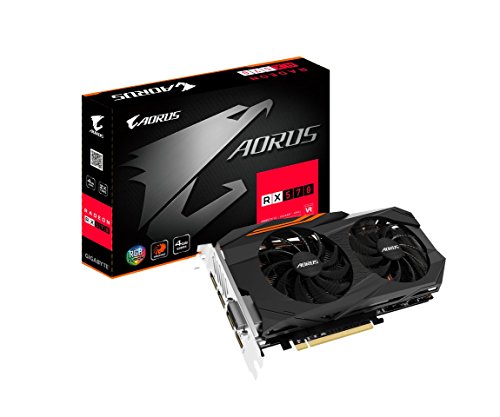
  • Best budget graphics card   Gigabyte Aorus Radeon RX 570

    The Gigabyte Aorus is a gorgeous, well-performing graphics card. The Radeon RX 570 is the best sub-$200 gaming option around—but it isn't much of a step up over the RX 470.

    The best low-cost graphics card you can buy right now didn't start off as one. The AMD Radeon RX 570 started off as a $180 refresh of the already-great Radeon RX 470, but now that 2018's cryptocurrency crunch is over and Nvidia's new wave of mainstream GPUs is starting to crest, this family of graphics cards is starting to get cheap. Like, really cheap. "You can always find a Radeon RX 570 for $130 with two free games thrown in" cheap.

    That's an incredibly enticing price for a superb 1080p graphics card that can hit the hallowed 60 frames per second mark at High or Ultra settings in most modern games. You may need to tinker with some visual settings to achieve that goal, though. Both 4GB and 8GB versions are available. Always take more memory if you can afford it in a graphics card, but the cheaper 4GB models should hold up fine at 1080p resolution in most games.

    The insane value proposition of these discounted Radeon RX 570 graphics cards have rendered true budget GPUs like the GeForce GTX 1050 Ti and Radeon RX 560 obsolete unless you need a graphics card that doesn't require any extra power connections. Just get one of these—and enjoy those free games while you're at it.

    Best 1080p graphics card   EVGA GeForce GTX 1660 XC Ultra

    Nvidia's GeForce GTX 1660 and EVGA's superb XC Ultra custom design result in a new mainstream gaming champion. This is the graphics card you want for 1080p gaming at 60 frames per second.

    Buckle up: While AMD claims the victory in the budget category, from here on out, the best graphics cards all belong to Nvidia, which recently rolled out both GeForce RTX 20-series and GTX 16-series GPUs.

    Many PC gamers play on basic 1080p, 60Hz monitors, thanks to their compelling blend of resolution, speed, and affordable pricing. The best graphics card for feeding those displays is Nvidia's $220-and-up GeForce GTX 1660, which we crowned "the new 'sweet spot' champion" in our review. The GTX 1660 beats the snot out of the Radeon RX 580—our previous long-standing sweet spot recommendation—in performance, soaring well past 60 fps in the games in our testing suite. It's even faster than the Radeon RX 590, a card that costs $40 more at retail. On top of the performance advantage, the GeForce GTX 1660 comes equipped with 6GB of RAM, runs cool, and is incredibly power-efficient compared to its Radeon rivals. Plus, modern GeForce GPUs now play nice with affordable FreeSync monitors as well as pricier G-Sync display option. The GTX 1660 is a no-brainer.

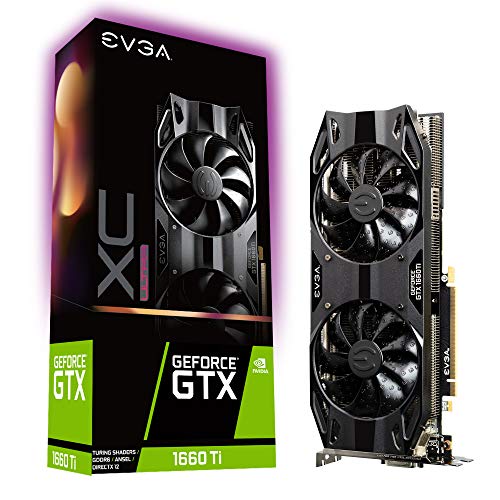
    A great 120Hz/144Hz 1080p gaming option EVGA GeForce GTX 1660 Ti XC Ultra

    The EVGA GeForce GTX 1660 Ti XC Ultra strips out fancy extras to focus purely on great performance in all functional areas. It's an outstanding all-around graphics card for 1080p and 1440p gaming.

    Well, most of the time. We've recently witnessed incredibly good sales for the Radeon RX 580 that bring it down to the $170 or $180 range, with two free triple-A games thrown in. The GeForce GTX 1660 pummels it, but if you can find a deal that juicy, the Radeon RX 580 still delivers an outstanding 1080p gaming experience.

    Conversely, if you're playing on a 1080p monitor with an ultra-fast 120Hz or 144Hz refresh rate, consider investing in the more powerful $280 GeForce GTX 1660 Ti instead. It provides significantly more performance legroom than the GTX 1660, and you'll appreciate it at those higher speeds. The GTX 1660 Ti could double as an entry-level 1440p gaming card, too.

    Best 1440p graphics card   Nvidia GeForce RTX 2060 Founders Edition

    The Nvidia GeForce RTX 2060 Founders Edition delivers superb 1440p and 1080p gaming as well as real-time ray tracing in an affordable package. The design of the graphics card is stunning, too.

    Now we're getting into the futuristic stuff—the GeForce RTX 20-series graphics cards, rife with hardware dedicated to real-time ray tracing and AI enhancements. But beyond those bleeding-edge extras, Nvidia's RTX GPUs can just plain game.

    The GeForce GTX 1660 and 1660 Ti are fine options for a decent 1440p/High gaming experience, but you won't be able to crank graphics options to the max and still hit 60 fps in many games. That's where the $350 GeForce RTX 2060 comes into play. This card delivers outstanding frame rates at 1440p even with all the bells and whistles turned on. It can feed the needs of a high-refresh-rate 1080p display, too.

    Mentioned in this article

    The GeForce RTX 2060 is about 10 to 20 percent faster than the previous-gen GTX 1070, our last 1440p gaming champion. While it can't quite topple the GTX 1080 or Radeon Vega 64 in raw performance, it costs a lot less than those options while running much cooler, quieter, and more efficiently. It trades blows with AMD's Radeon Vega 56, but that card costs more while lagging behind the RTX 2060 in those crucial quality-of-life considerations.

    Here's where Nvidia's bet on the future of gaming takes shape. The cutting-edge Turing GPU inside the 2060 and its pricier RTX siblings enable real-time ray tracing and AI-enhanced image processing, thanks to hardware dedicated to those tasks. The first wave of RTX-enabled games have been slow to appear, but they're finally picking up steam, with Battlefield V, Final Fantasy XV, Shadow of the Tomb Raider, Anthem, and Metro Exodus—which offers the best RTX implementation so far—flying the flag for Nvidia's new tech.

    Next page: High-end graphics cards, 4K graphics cards at 60Hz and 144Hz, what to look for in a graphics cards

    quarta-feira, 8 de maio de 2019

    Best Graphics Cards 2019: Top GPUs for Every Budget

    Share.

    To RTX or not, that is the question. By josh norem

    Be sure to visit IGN Tech for all the latest comprehensive hands-on reviews and best-of roundups. Note that if you click on one of these links to buy the product, IGN may get a share of the sale. For more, read our Terms of Use.

    The GPU market is in a pretty interesting place right now. After what felt like eternity, Nvidia introduced both its premium RTX GPUs and some of its most affordable GTX graphics cards yet. Meanwhile, AMD introduced its Radeon VII, shaking things up a bit by giving gamers an 7nm GPU alternative to Nvidia's fully-fleshed out Turing line-up.

    So, what's the best graphics card right now? That answer depends on your needs and budget. It takes a lot of research, time, and knowledge to pick out the best graphics card out of the dozens of models and hundreds of variants of said GPUs, however, that's exactly why I put together this guide to the best graphics cards on the market for you

    TL;DR – These are the Best Graphics Cards:

    1. Asus ROG Strix GeForce GTX 1660 Ti OC The Best Graphics Card CUDA Cores: 1,536 ● Base Clock: 1,500MHz ● Boost Clock: 1,890MHz ● Video Memory: 6GB GDDR6 ● Memory Speed: 12Gbps ● Memory Bus: 192-bit ● Power Connectors: 1 x 8-pin ● Outputs: 2 x DisplayPort 1.4, 2 x HDMI 2.0b ● Size: 11.9" x 5.2" x 1.97"

    If you ask me, the best graphics card isn't automatically the most powerful, but rather the one that strikes the right balance of performance to price. Following that logic, the Asus ROG Strix GeForce GTX 1660 Ti OC (read our review) is the best graphics card you can buy.

    For a little more than $300 this graphics card churns out silky smooth 1440p gaming in most cases, and even some playable 4K experiences hovering around 30 frames per second (fps). For a card meant to replace the Nvidia GTX 1060, it hits above its weight class, offering performance on par with the GTX 1070 and GTX 1070 Ti—and cuts close to the RTX 2060's performance.

    The Asus ROG Strix GeForce GTX 1660 Ti OC is a top of the line, overclocked version of Nvidia's mid-range card, so those looking to spend less than $300 for a fast GPU should consider the more affordable EVGA GeForce GTX 1660 Ti XC Gaming or Gigabyte GeForce GTX 1660 Ti Windforce OC 6G instead.

    2. Asus ROG Strix GeForce RTX 2080 Ti OC The Best 4K Graphics Card CUDA Cores: 4,352 ● Base Clock: 1,350MHz ● Boost Clock: 1,665MHz ● Video Memory: 11GB GDDR6 ● Memory Speed: 14Gbps ● Memory Bus: 352-bit ● Power Connectors: 2 x 8-pin ● Outputs: 1 x USB-C, 2 x DisplayPort 1.4, 2 x HDMI 2.0b ● Size: 12" x 5.13" x 2.13"

    Seriously, the Asus ROG Strix GeForce RTX 2080 Ti OC (read our review) is an amazing graphics card if you want to run the latest games at a full 60 fps, or faster, at 4K and Ultra quality settings. Also, if you want to live in the Nvidia's world of ray-traced graphics, look no further, you won't find another consumer GPU better equipped to give you realistic reflections in Battlefield V.

    Out of all the RTX 2080 Ti GPUs I tested, including the Zotac GeForce RTX 2080 Ti AMP (read our review), this card came out on top in terms of performance. The Asus ROG Strix GeForce RTX 2080 Ti OC's overclocking goes a step further than the Zotac and the other 2080 Ti cards, putting it at the top of my list.

    While this is the absolutely most powerful consumer GPU you can get, the power increase doesn't march lock-step with its price. You will pay significantly more for a 2080 Ti over a 2080, with only a slight jump in performance. If you absolutely require the best of the best, by all means, but if you don't see the value in it, consider any of the other GPUs on my list.

    Best 1440p RTX Graphics Card CUDA Cores: 1,920 ● Base Clock: 1,365MHz ● Boost Clock: 1,800MHz ● Video Memory: 6GB GDDR6 ● Memory Speed: 14Gbps ● Memory Bus: 192-bit ● Power Connectors: 1 x 8-pin ● Outputs: 3 x DisplayPort 1.4, 1 x HDMI 2.0 ● Size: 8.3" x 4.7" x 1.61"

    Out of the entire Nvidia Turing lineup, the Zotac Gaming GeForce RTX 2060 AMP (read our review) is arguably the most sensible GeForce RTX card to buy. For just a little more than the price of a GTX 1060 (originally $299), you get a much faster card. And unlike its 10-series predecessor, there's no 3GB model: the 2060 comes with a standard 6GB GDDR6 video memory.

    In my testing, I had no problem getting over 30 fps in 4K with everything turned up in games like Monster Hunter World. Games like Battlefield 1 and Far Cry 5 almost hit 60 fps at the same settings. Impressive for a card under the $350 mark. At 1440p, the RTX 2060 also knocks it out of the park, crushing the 60fps mark, and often, surpassing it.

    4. Asus TUF Gaming GeForce GTX 1660 OC Best 1080p Graphics Card CUDA Cores: 1,408 ● Base Clock: 1,530MHz ● Boost Clock: 1,845MHz ● Video Memory: 6GB GDDR5 ● Memory Speed: 8Gbps ● Memory Bus: 192-bit ● Power Connectors: 1 x 8-pin ● Outputs: 1 x DisplayPort 1.4, 1 x HDMI 2.0b, 1 x DVI-D ● Size: 8.1" x 4.8" x 1.8"

    The GTX 1660 is the creamy middle of the Nvidia new mid-to-entry level 16-series family. It has the 6GB of video memory and handily beats the performance of last-gen's GTX 1060 GPU. If you don't need to run your games on Ultra at 60fps in 4K, the GTX 1660 can easily run them at 60 fps on 1080p—and 1440p Ultra.

    It might not have the magical RTX designation like its bigger brothers, but it costs significantly less than the RTX 2060 while providing much of the same FHD and QHD gaming performance. This is the graphics card PC Gaming beginners should buy.

    5. AMD Radeon VII The Best AMD Graphics Card Stream Processors: 3,840 ● Base Clock: 1,400MHz ● Boost Clock: 1,800MHz ● Video Memory: 16GB HBM2 ● Memory Speed: 2Gbps ● Memory Bus: 4,096-bit ● Power Connectors: 2 x 8-pin ● Outputs: 3 x DisplayPort 1.4, 1 x HDMI 2.0b ● Size: 11.02" x 4.92" x 1.57"

    The newest GPU from AMD, the Radeon VII (read our review), is also its best GPU yet. The "world's first 7nm gaming GPU" delivers great 4K and stellar 1440p performance, and its list price is unsurprisingly better than a comparable card from Nvidia.

    You don't get the fancy ray-tracing promised in the new RTX series cards, but given how few games take advantage of the new technology, it's probably still not worth the trouble yet. In my testing the Radeon VII proves to be a great GPU for both gaming and compute tasks. It's 16GB of video RAM might look excessive on paper, but it comes in handy in more games than you would think, as multiple modern titles end up using more than 8GB of video memory.

    If you're an AMD diehard, or you're just looking for a great way to dive into the world of 4K gaming without paying the Nvidia tax, the Radeon VII is a great choice as both the best AMD card around right now and one of the best graphics card for the money.

    6. EVGA RTX 2080 8GB FTW3 Ultra Best for High-End Gaming for Most Gamers CUDA Cores: 2,944 ● Base Clock: 1,515MHz ● Boost Clock: 1,860MHz ● Video Memory: 8GB GDDR6 ● Memory Speed: 14Gbps ● Memory Bus: 256-bit ● Power Connectors: 2 x 8-pin ● Outputs: 1 x USB-C, 3 x DisplayPort 1.4, 1 x HDMI 2.0b ● Size: 11.89" x 5.48" x 2.75"

    The EVGA RTX 2080 8GB FTW3 Ultra has an 1,860MHz boost clock, three big, whisper-quiet fans to keep it running cool, but perhaps most importantly, it has the power of RGB lighting. If you're going to spend a bunch of money on a graphics card to make your gaming PC into a 4K powerhouse, you're going to want to show it off, so why settle for anything less than flashy lighting?

    Beyond the flashy presentation, the FTW3 Ultra comes with EVGA's X1 overclocking software, so you can push it beyond its factory limits. And really, isn't that the true heart of PC gaming? To give you an idea of what the EVGA is capable of, you can check out the RTX 2080 Founders Edition (read our review), and then imagine it with RGB lights and overclocking.

    7. PowerColor Red Dragon Radeon RX 570 Kick Off Your Esports Career with this Graphics card Stream Processors: 2,048 ● Base Clock: 1,168MHz ● Boost Clock: 1,250MHz ● Video Memory: 4GB GDDR5 ● Memory Speed: 7Gbps ● Memory Bus: 256-bit ● Power Connectors: 1 x 8-pin ● Outputs: 3 x DisplayPort 1.4, 1 x HDMI 2.0b, 1 x DVI-D ● Size: 10.04" x 5.39" x 1.85"

    The AMD Radeon RX 570 GPU is a well performing graphics card for 1080p gaming, and its particularly spectacular for eSport gaming. Its low, low price of just $130 makes it spectacular buy for users on a budget. With 4GB of video memory and a 1,250MHz boost clock, it offers all the performance you need to play Overwatch, Dota 2, and Rainbox Six Siege at a competitive level.

    Whether you're using a 1080p 144Hz gaming monitor or 240Hz gaming monitor, this graphics card gives you fantastic Full HD gaming experience without breaking the bank. The RX 570 is a superb choice for eSports fans.

    8. Nvidia Titan RTX The Out of Your Mind Graphics Card CUDA Cores: 4,608 ● Base Clock: 1,350MHz ● Boost Clock: 1,770MHz ● Video Memory: 24GB GDDR6 ● Memory Speed: 14Gbps ● Memory Bus: 384-bit ● Power Connectors: 2 x 8-pin ● Outputs: 1 x USB-C, 3 x DisplayPort 1.4, 1 x HDMI 2.0b ● Size: 10.5" x 4.38" x 1.8"

    When you absolutely, positively need the most powerful graphics card money can buy, you should look no farther than the Nvidia Titan RTX. For the kingly price of $2,500, the Titan RTX is fully loaded with an absurd 4,608 CUDA cores, 24GB of GDDR6 video memory, and 1,770 MHz boost clock. With these supreme specs, it offers 4K Ultra gaming at frame rates well above 60 fps that no other single GPU can offer.

    But honestly, buying this card just to play games would be a waste, as it's also rendering powerhouse for video editing, 3D rendering, and other creative pursuits. If you have the money and the need for a GPU this powerful, the Nvidia Titan RTX is the graphics card of your dreams.

    What to look for in a Graphics Card

    Below I explain how to pick the GPU for the display you have, why there are so many variants of the same Nvidia and AMD graphics cards, and a few factors you should consider when buying a GPU.

    Above all, you should buy the graphics card you need for the display you're using. If you're gaming on a Full HD monitor, it would be a huge waste to buy a graphics card designed to play games at 2160p or 1440p. Likewise, you'll want a powerful graphics card to drive games playing on that premium 4K gaming monitor or 4K TV.

    I've laid out what are the best graphics cards to play games at 1080p, 1440p, and 2160p resolutions above, but here are some more general rules. For a decent to high-frame rate Full HD experience, you should look at GPUs ranging from the GTX 1050 Ti to the GTX 1660 Ti on Nvidia's end. If you're looking at AMD's graphics card family, you'll want a Radeon RX 480 or up.

    Jumping up to QHD resolutions will require a more capable graphics card, ideally an Nvidia GTX 1660 Ti or AMD Radeon RX 580 and up. 4K gaming using a single card is still a tough proposition, but it's actually within reach of the latest graphics cards like the Nvidia RTX 2080 and AMD Radeon VII.

    Graphics card variants

    Ok, you've decided which graphics card you want, great! However, even with this monumental decision out of the way, the world of GPUs isn't done being confusing and daunting just yet.

    Although there are only two companies—Nvidia and AMD—that actually manufacture the GPUs, there are dozens of different variants of the same graphics card. For example, when the most recent graphics card launched, the Nvidia GTX 1650, there was a multitude of different versions from Asus, Gigabyte, MSI, EVGA and the list goes on.

    In this case, while Nvidia may have introduced only one new GPU model, vendors or board partners will introduce their own versions featuring different overclock settings, cooling systems, and other differentiating factors I will explain below.

    Length: One of the number one factors you should consider before plopping down cash for that shiny new graphics card is whether it will actually fit. If you're building your PC in a Mini ITX case, you should be looking at the smallest or mini graphics cards that will actually fit inside.

    Overclocking: Most third-party cards—and even Nvidia's own Founders Edition cards—will often come factory overclocked, and this means the graphics card has been tuned to operate above its rated maximum clock speed. As you might expect, the higher the number the better the performance.

    At this point you won't find many, including the entry-level cards, without some amount of 'overclocking from the factory.' However, even without a factory overclock, it's easy enough do it yourself using software such as EVGA Precision X or MSI Afterburner.

    Cooling solutions: In your quest for the best graphics card, you might have noticed that some models come with one, two, or up to free fans. As you might expect, more fans equals better cooling, but there are also two distinct ways of keeping your graphics card chilled.

    GPUs equipped with only one fan use a blower style cooler, which means the card sucks in air and blows it out the back like a leaf blower. Dual and triple fan setups are often used in conjunction with an 'open-air cooling systems,' which are designed move cool air through the open heatsinks and exhaust heat in every direction.

    Blower style coolers are typically most useful for PCs built into small cases to help alleviate their restricted airflow. If the system your building is Micro ATX or Mid tower sized, you'd be better off with an open-air cooled graphics card, as there are more mounting points for multiple case fans to do the brunt of cooling and two (or three) fans are always better than one.

    RTX vs GTX: With Turing Nvidia didn't just introduce better, faster graphics cards it also debuted RTX GPUs with hardware designed to support real-time ray tracing, and AI-powered super sampling and anti-aliasing (known as Deep Learning Super Sampling).

    So far, Nvidia premium RTX 20-series cards—including the RTX 2080 Ti, RTX 2080, RTX 2070, RTX 2060, and all their mobile counterparts—are the only GPUs to feature these dedicated components.

    Thankfully, Nvidia decreed in early April that you don't need an RTX card with dedicated RT Cores to process real-time ray tracing, so now both its new GTX 16-series and (most) older 10-series cards can run games with ray tracing turned on.

    DLSS is still an RTX exclusive since it requires Tensor cores to function, but it's a niche performance smoothing feature compared to the strikingly realistic reflections and complex shadows effects that ray tracing produces.

    Bargain your way to getting a graphics card

    Strangely, one of more affordable ways to get yourself the latest graphics card is to buy a prebuilt gaming PC while it's on sale. Gaming PCs will often see discounts for hundreds of dollars off, so not only are you saving a ton of money, you're also avoiding potential headaches that can accompany a DIY build—and you also get a warranty. Prebuilt PCs have come a long way, too.

    They aren't proprietary machines with randomly soldered-on components. They're mostly as upgradeable as anything you might put together on your own. Another way of enjoying the latest graphics cards is through gaming laptops.

    There are plenty of Nvidia RTX 20- and GTX 16-series gaming laptops out there right now. The new GTX gaming laptops have also hit the streets and they're far more affordable than the RTX laptops introduced during CES 2019.

    More Expert Tech Roundups

    segunda-feira, 6 de maio de 2019

    6 of the best gaming PCs in the UK: Why we love Corsair, Lenovo, Dell, and more in 2019

    The popularity of gaming PCs has exploded in recent years. Sure, there are plenty of people who won’t abandoned their beloved consoles. But a large number of gaming enthusiasts have been shifting their attention. And with good reason. 

    For starters, the games are cheaper and the breadth available is truly astounding. After all, console exclusives are (mostly) a thing of the past. You can use your PC to play the latest strategy and simulation games as well as the top offerings in eSports and first person shooters. Additionally, thanks to the PC’s open platform, you also have access to a wide array of wildly inventive independent games. No matter your penchant and preferences, you’re always guaranteed to find something that matches your mood, skill and desires.

    Perhaps just as critical, PCs themselves are sleeker and more affordable. No longer do you have loud, clunky towers overtaking large swaths of space. They are now relatively quiet, power conscious machines that are small enough to remain unobtrusive. 

    Moreover, gaming PCs also deliver impressive graphics that certainly rival those of Xbox and PlayStation. And they’re even compatible with a variety of controller options; you can use anything from a keyboard and mouse to steering wheel and joystick. Hence you can kick butt with whatever equipment you prefer. Best of all, PCs can easily be modified. That’s right, you have the power to continually alter your computer to ensure the perfect gaming experience.

    We assume that you’re now in desperate need of a new gaming PC. Well, as you shop around, you’ll definitely want to pay attention to these facets:

    Games You Play: We beseech (yes, beseech!) you to consider the games you play when purchasing a PC. That’s because they’ll dictate the components you’ll need or want â€" be it super-fast processors, high-end graphics, etc. If possible, try and think about additional games you may play in the future. That way you’ll have a system that’s ready to go.

    CPU and Cooling: You’ll find that a lot of higher end gaming computers are equipped with six-core processors. This is great if you plan on using the machine for additional tasks such as photo and video editing. However, if you are strictly purchasing your PC for gaming, you don’t actually need six cores. Many gamers suggest cutting back and putting your resources towards improved graphics or better solid state drives.

    Storage: When it comes to storage, you have two major options â€" solid state or hard drive. Ever since their prices have dropped, solid state drives have understandably grown in popularity. After all, they have a faster boot time, load games quickly and have a minimal noise level. Solid state drives also tend to require less power. However, if you’re using your PC for work or activities beyond gaming, you’ll likely want to opt for a hard drive. And it’s definitely the way to go if you need archival storage for video and photos.

    Memory: RAM is certainly another important component of your gaming PC. That’s because games can actually be taxing on memory. Therefore, it’s recommended that you purchase a PC that has a minimum of 8GB of RAM. If you can kick it up to 16GB, even better. This will help improve your computer’s overall performance and curb any potential bottleneck.

    Graphics Card: There’s no denying that good graphics are essential to the gaming experience. More expensive computers typically come with higher end cards. But don’t worry if you can’t afford a pricier model. Most PCs still provide mid-range graphic cards. And if you’re a person who never changes the default settings on your computer, it shouldn’t matter too much. Plus, you can always swap out your card for a better one in the future. 

    Audio and Communications: Many of today’s most popular games are designed with surround sound. Thankfully, the vast majority of PCs are made with on-board, multi-channel audio codecs that deliver a fully immersive experience. Of course, you may also want to consider purchasing a quality headset and microphone as well.

    Accessories/External Components: We understand that when it comes to purchasing gaming equipment, the computer is the star of the show. However, don’t underestimate the value of good accessories. These also have a big impact on your gaming experience. You’ll want a keyboard, mouse, headset, and other accessories that are comfortable and guaranteed to run well.

    Ability to Upgrade: When buying a gaming PC, your ability to upgrade is key. After all, it’s common for gamers to swap out a component or two as new games and products emerge. And it’s a whole lot cheaper to do this than to purchase an entirely new computer. Therefore, you’ll want to buy a PC that allows you to access parts like the motherboard, GPU, and RAM. 

    Budget/Price: Unless you have unlimited funds, the price tag will also play a role in your decision. If you’re looking for a decent computer with basic to mid-level specs, you can expect to pay around £500. If you are willing to spend £700 or so, you can certainly find a solid tower with mid-to-high level specs. And if you’re feeling flush and ready to drop £1,000 or more, you’ll be able to buy a very high-end system with top-notch specs like multiple GPUs and a minimum of two drives (either hard or solid state).

    Now that you know what to look out for, you’re ready to peep our top picks.

    Super sleek and compact design Smartly designed with custom CPU and GPU liquid cooling technology for a high-end performance. 1. Corsair One Pro If you’re tight on space but crave the HD and 4K power of a larger machine, consider the Corsair.
  • Processor Speed: 4.2 GHz
  • RAM: 16 GB
  • Storage: 480 GB
  • Are you (or your roommates) tired of the excess white noise spewed by other, lesser PCs? Then you’ll definitely want to check out the Corsair One Pro. Barely audible, it operates at 20 dBA when idle. And that’s just the tip of its appeal. Indeed, this sleek and sexy PC is manufactured with aircraft grade aluminium and features customisable LED detailing. And thanks to its extraordinarily compact size, it’s virtually guaranteed to fit within (and complement) any room. The Corsair is also smartly designed with custom CPU and GPU liquid cooling technology for high-end performance. And it provides amazing streaming, 4K and VR experiences. Additionally, the One Pro is built with amazing components like an NVIDIA GeForce GTX 1080 graphics card, INTEL Core i7-7700K processor, and CORSAIR's award-winning DDR4 memory. Honestly, it’s so good even your grandparents will be begging to play with it.    You really get bang for your buck Processor speed is not as fast as some others A great option right away, but also ideal for future upgrades. 2. CyberpowerPC Wyvern Runs great right out of the gate but can also be upgraded at a future date.
  • Processor Speed: 2.9 GHz
  • RAM: 8 GB
  • Storage: 1 TB
  • If you want a machine packed with power but don’t have a load of disposable income, think about getting the CyberpowerPC Wyvern. This fantastic computer can easily run any mainstream game you like â€" and at high settings to boot. What’s more, it’s also able to handle virtual reality. More specifically, the PC is armed with a Radeon RX 580 graphics card, an Intel Core i5-7400 processor, and a 1TB hard drive. If after reading all of these sweet details you’re still pining for a higher end machine, you’re in luck. That’s because the Xtreme is a breeze to open up, making it ideal for future upgrades.  Highly portable • Outstanding audio Doesn’t perform as well as higher priced machines Powerful gaming system in a smartly designed, movable cube. 3. Lenovo Legion C530 Cube A unique system that’s designed with portability in mind.
  • Processor Speed: Up to 4.60 GHz
  • RAM: Up to 16GB
  • Storage: 1 TB
  • Have you always dreamed of taking your gaming on the road but dreaded the idea of dragging around a cumbersome desktop? Well, Lenovo has the answer to your gaming prayers. The Legion C530 Cube is a unique system that’s designed with portability in mind. A mere 24 pounds and replete with an integrated carrying handle, the C530 can easily be moved across the room or the country. And don’t be fooled by its diminutive size. Its 8th generation Intel processor and 128 GB SSD is packed with the power of a larger PC. Even better you have the ability to choose whether you want a NVIDIA GeForce GTX 1060, 1050 Ti or 1050 graphics card. And should you want to upgrade your Legion in the future, you’re promised ease of access with its one press, tool-free upgrade system.  Affordable • Upgradable Fairly affordable price tag with great customer support. 4. ASPIRE GX-281 Great brand with even greater support.
  • Processor Speed: 3.2 GHz
  • RAM: 8 GB
  • Storage: 1000 GB
  • Are you toying with the idea of getting into gaming? Well then, we have the PC for you! The Acer Aspire GX-281 is a great machine for any novice. For starters, it has a fairly affordable price tag. What’s more, Acer offers great customer support. Trust us â€" this really comes in handy as you familiarise yourself with all facets of gaming. And while it’s definitely not the most high end option around, you’ll still be privy to a decent gaming experience. That’s all thanks to the AMD Ryzen 5 1400 Quad-Core Processor and NVIDIA GeForce GTX 1050 graphics card. Finally, similar to the computers listed above, the GX-281 can easily be upgraded in the future. Great HD gaming experience • Decent amount of storage Less power than other machines Perfect price point for those who simply want to plug and play. 5. Dell Inspiron DT 5680 Mixing a modest price tag with a smooth gaming experience.
  • Processor Speed: 3.2 GHz
  • RAM: 8 GB
  • Storage: 1.25 TB
  • If you have a keen need to game but a low balance in your bank account, fear not. The good folks at Dell have your back. The Inspiron Gaming Desktop mixes a modest price tag with a smooth gaming experience. This particular PC is designed with an 8th generation Intel Core processor, a Nvidia GeForce GTX 1060 graphics card, a 1TB hard drive and low-key case lighting (so it’s easy on the eyes). Importantly, the Inspiron is also configurable. Therefore, when you get some more coin, you can kick your rig up a notch (if you so desire).  Stunning graphics • Never overheats You’re looking for a gaming system with power and pop? Well then you’re looking for a CyberPowerPC Panzer. 6. CyberPowerPC Gamer Panzer A high-powered machine that provides a wholly immersive experience
  • Processor Speed: 3.6 GHz
  • RAM: 32 GB
  • Storage: 2 TB
  • We’re not going to mince words. If you want a high-powered machine that provides a wholly immersive experience, we recommend the CyberPowerPC Gamer Panzer. It’s built with the NVIDIA GTX 1080, arguably one of the best graphic cards on the market. As if that wasn’t enough, it has an Intel i7-770K 3.6 Ghz quad-core processor to help ensure a smooth gaming experience from start to finish. The Panzer also features a tempered side glass panel along with a liquid cooling system, so there’s no fear of overheating with this PC. Oh, and if you’re still on the fence, CyberPowerPC provides free lifetime tech support. What a find! 

    sábado, 4 de maio de 2019

    The best gaming desktops for 2019

    We rigorously review new gaming desktops nearly every week, each with its own quirks and eccentricities. Performance is always important, but we also look for the long-term viability of these systems in terms of extra features, upgradability, and noise levels.

    The best you can buy right now is the HP Omen Obelisk. It's not necessarily the most powerful gaming PC you can buy, but it offers a fantastic blend of performance, sleek design, and value. We've also included fantastic options below for different form factors and budget levels.

    HP Omen Obelisk The best gaming desktop

    Why you should buy this: HP's Omen Obelisk delivers punchy performance in a sleek, modern design at an affordable price point.

    Who it's for: Gamers who don't want to build a system from scratch but demand RTX graphics performance

    Why we picked the HP Omen Obelisk:

    With plenty of configuration options and a price point to meet any budget, HP's Omen Obelisk is a sleek desktop that you'll be proud to showcase on your desk. With a durable metal build, sleek all-black design with complementary red accents, and a see-through tempered glass window to add visual interest to the powerful liquid-cooled Intel 9th-generation Core i9-9900K and Nvidia GeForce RTX 2080 graphics inside, the Omen Obelisk is as powerful as it is beautiful.

    If you're looking for a system primarily for basic computing tasks, you can bring the price down by configuring the Omen Obelisk with less powerful components. The late-2018 configuration we tested didn't come with the latest silicon choices, giving it lower marks than competing systems, but HP's updated 2019 Omen Obelisk comes with the latest processors from Intel and Nvidia, making it a great and affordably priced option for even the most demanding gamer.

    But don't let the Obelisk's humble looks and pre-built classification fool you. With a spacious chassis and support for up to dual graphics, DIY tinkerers can grow the Omen Obelisk into a system that's even more powerful in the future. With options for the latest silicons, support for 64GB of RAM, upgrades for Intel Optane memory support, and three drive bays for plenty of storage, the Omen Obelisk is a powerful system that will last gamers for years. Given its understated aesthetics, even non-gamers and some creatives will find the sleek lines of the Omen Obelisk appealing. 

    Read our full HP Omen Obelisk review

    Digital Storm Aventum X Best powerhouse gaming PC digital storm aventum x review 5Chuong Nguyen/Digital Trends

    Why you should buy this: You're looking for unrivaled performance and cost is no object.

    Who it's for: Gamers who crave the best performance

    Why we picked the Digital Storm Aventum X:

    If you have a budget to consider, then you probably shouldn't look at Digital Storm's Aventum X. With two large see-through glass windows, the Aventum X was created as both a showpiece to highlight what's achievable when you combine the best silicons — in multiple quantities — available and a trophy that's an object of desire for any gamer. Like a sports car, at a cost in excess of $50,000, the Aventum X is truly decadent, but it delivers unstoppable, unrivaled performance.

    As a built-to-order system, the Aventum X is a highly configurable systems accommodating both surface-level customization — trim color, backlighting, and cooling options — to choice of silicon. Topping out with a 28-core Intel Xeon W-3175X processor, 512GB of RAM, and up to three bays of storage, support for up to four Nvidia GeForce RTX 2080 Ti graphics card, liquid cooling options, noise dampening design upgrades, and three high performance computing processors, the Aventum X is an unstoppable beast that delivers unrivaled performance.

    Despite the glow emitted by the numerous RGB-lit liquid cooling elements, the illuminated multi-GPU setup, and the powerful fans that adorn the unit, the Aventum X never appeared too garish. Though the Aventum X's aesthetics may not be demure enough to use in an office studio for creative work, peering at the highly organized internals by peering through the glass makes it seem like you're looking at an over-engineered car engine rather than an ostentatious gaming rig. This massive full-size tower accommodates plenty of space for future upgrades, but fully configured, it's hard to imagine what you can add to the Aventum X to give it more performance.

    Read our full Digital Storm Aventum X review

    Intel Hades Canyon NUC The best mini gaming desktop intel hades canyon nuc8i7hvk nuc frontonBill Roberson/Digital Trends

    Why should you buy this: You want the best performance in the smallest form factor possible.

    Who's it for: Gamers who play at small desks or entertainment centers.

    Why we picked the Intel Hades Canyon NUC:

    Wanting a desktop this small is certainly for a niche group of people out there. The 1.2-liter box is for the person who wants an ultra-clean desk or to hide their PC under an entertainment center. There's definitely a 'wow' factor with the kind of performance Intel's mini-PC achieves. Those high framerates come from the killer combination of the Core i7-8705G processor and AMD Radeon RX Vega graphics. By means of comparison, you should see framerates in-between a GTX 1050 Ti and a 1060.

    There's one catch though with the NUC — it doesn't come with RAM or a hard drive installed. That's right, the already relatively high $740 starting price doesn't come with necessary components for computing. Tinkerers will love that, but not everyone wants to buy a system that won't work right out of the box.

    Read our full Intel Hades Canyon NUC review

    Origin PC Neuron Best compact gaming desktop

    Why you should buy this: You need a compact tower to fit in tight spaces that doesn't sacrifice performance.

    Who it's for: Gamers who demand heavyweight performance in a lightweight package

    Why we picked the Origin PC Neuron:

    Though it's not the most compact tower on the market, the star of Origin PC's Neuron is its versatile design that allows this sleek and powerful gaming rig to go between game room to living room with ease. The star of the Neuron's configurable design is its removable and repositionable magnetic feet, allowing this tower to stand upright or rest horizontally as a living room home theater PC (HTPC).

    Don't be fooled by the Neuron's small size. Despite its compact footprint, the Neuron had some of the best benchmark results we've seen. If you demand the best Neuron money can buy, Origin allows gamers to configure the unit with a liquid-cooled 18-core Intel Core i9-9980XE processor, dual-Nvidia RTX graphics, and five drive bays, giving this desktop a surprisingly big punch despite its small stature. And for gamers who need to make future upgrades, a tool-less design with a flip-open glass door makes it easy to access the unit's internals. If you know you're going to upgrade some of the internal silicon down the road, you may want to consider the optional Evolve upgrade warranty plan, which pays market value when you trade in existing parts. This will save you the time and hassle of trying to existing components yourself on the used market.

    Like the HP Omen Obelisk on this list, the Neuron comes with more grown-up aesthetics, boasting a simple, modern design with minimal gaming flourishes. The single glass side panel showcases some of the technology inside, including the liquid cooling, radiators, and even though there is RGB lighting, it is done tastefully. For those who want a more demure desktop, the candy apple red finish on our metal-clad Neuron case can be swapped for a simple black hue at the time of purchase.

    Building your own custom gaming rig from scratch can be a daunting endeavor given the numerous options for parts available. But given the extensive level of customization Origin PC offers to the case design and the silicon parts inside, buying a Neuron is like getting a pre-built gaming PC that feels like it was designed specifically for you. With Origin PC curating the choices for the graphics, processor, storage, and memory, choosing these options for a pre-built Neuron feels less intimating than going the DIY route.

    Read our full Origin Neuron review

    Dell Inspiron 5680 Gaming Desktop The best budget gaming desktop Dell Inspiron 5680 reviewBill Roberson/Digital Trends

    Why you should buy this: You want performance without breaking the bank.

    Who it's for: Budget-minded gamers who want a slick gaming rig.

    Why we picked the Dell Inspiron 5680:

    Not everyone wants (or is able) to spend thousands on a gaming PC. Luckily, there are potent options out there for even the most frugal gamers, and Dell's Inspiron 5680 is at the top of the list.

    If you're a fiend for gorgeous graphics, you can find better options, but few — if any — desktops offer the same level of power as the Inspiron for such a reasonable price. It's best suited to 1080p resolution, but it'll play demanding games like Battlefield 1 without breaking a sweat.

    In Battlefield 1, the Inspiron and its GTX 1060 never dipped far below 60 FPS at 1440p, even at ultra-high detail settings. To be fair though, our review unit wasn't the basic $600 model, but a slightly upgraded one which retails for $1,100. Either way, it's still an exceptionally capable machine at a bargain price. Dell also sells an AMD-powered version featuring up to an RX 570.

    The Dell Inspiron 5680 is a solid performer with a few drawbacks, but its low price and solid gaming performance make it a good choice, especially if you're looking to step into the world of PC gaming for the first time.

    Read our full Dell Inspion 5680 review

    How we test

    You've read our reviews. You've read our conclusions. And now you're wondering how we came to them. Reviews often lack context. We'll give out a score and analyze the finer points of desktop performance, but how do we reach those conclusions? How do we test these machines?

    Allow us to lift the veil. Here we'll explain the benchmarks we use for objective testing and the perspective from which we approach subjective topics. We don't expect everyone to agree with our opinions, but we hope that sharing our process will leave you better equipped to decide what desktop best fits your needs

    quarta-feira, 1 de maio de 2019

    Great games for your nongaming laptop

    razer-laptop-6876-006 CNET/Josh Miller

    There's no doubt that we're living in a golden age of PC gaming. The 4K, HDR graphics on games like Metro: Exodus and The Division 2 put their console counterparts to shame, and amazing new hardware from Nvidia and AMD, led right now by Nvidia's new RTX graphics cards, are blowing away previous performance benchmarks.

    But most of us are stuck with basic integrated Intel graphics. That's what's found on most laptops without a dedicated GPU, which is pretty much any work laptop. If that's your scenario, the options narrow considerably. Trying to run a high-end game on a pedestrian laptop is like watching Doom played via PowerPoint.

    Fortunately, there is hope. Many recent games, especially creative, critically hailed indie games, play just fine on your work laptop, and we've collected some of the best here. Below are five of our current favorites, plus a link to a further lis t of 25 more. 

    Thimbleweed Park Giant Bomb

    A throwback 2D mystery/adventure, think of Thimbleweed Park as a Twin Peaks episode set in a county fair. If you get hit with some deja vu for lost LucasArts classics like Monkey Island and Maniac Mansion, that's because some of the same team worked on this.

    See at GOG

    Scythe: Digital Edition Asmodee Digital

    One of the best tabletop games of the current board game revival has an excellent digital version as well. Scythe is a deep game of resource management and conquest set in a sci-fi-tinged, alternate history 1920s. Other key tabletop games, like Pandemic and Ticket to Ride, now have PC game versions as well.

    See at Steam

    Into the Breach Subset Games

    In our previous roundup, FTL, or Faster Than Light, was our pick for a simple, easy-to-run game that even serious PC gamers could get into. The developers have made an entirely different, but still familiar-feeling game in Into the Breach, which trades the engineering diagram of a spaceship in trouble for an isometric view of a city under alien siege.

    See at HumbleBundle

    Cuphead

    A game that earned a huge fan base long before it was released, Cuphead is notable for having an incredible hand-drawn art style, and for being insanely difficult. Originally found only on the Xbox One, the PC version has the added benefit of being very forgiving of low-end PC hardware. It's still not any easier, though. 

    See at Amazon

    Gris Devolver Digital

    Nominated by my colleague Lori Grunin, Gris is a side-scrolling adventure from the Limbo school of moody, evocative design. Instead of Limbo's monochromatic shadow world, Gris is painted with muted pastels, but that doesn't mean it's any more cheerful in the end.  

    See at Steam

    Bonus: Fortnite (Obviously)

    Why is Fortnite so incredibly popular? Probably because you can play it on anything this side of a scientific calculator. Besides Xbox, PlayStation and Nintendo Switch consoles, iOS and Android devices, and the all-important Monopoly platform, Fortnite is also extremely forgiving of your low-end laptop, as pointed out in our original games for nongaming laptops feature. That means it's probably playable on your work PC, but keep in mind your screen refresh rate and frames-per-second aren't going to be much help against serious competition. But at least you'll have an excuse as to why you suck. 

    If sneaking a few games onto your work or school laptop isn't enough, then check out our ranking of the most powerful gaming laptops today. Or, for about two dozen more great games for nongaming laptops, see our entire collection in the gallery below.